Allow me to blow the dust off this blog to give a big, big thank you.
Last week at the IBM Connect 2017 conference, I received the IBM Champion Lifetime Achievement award. Anyone who is not familiar with the IBM Champion program might not have a good sense of what this award means, but it's really a tremendous honor.
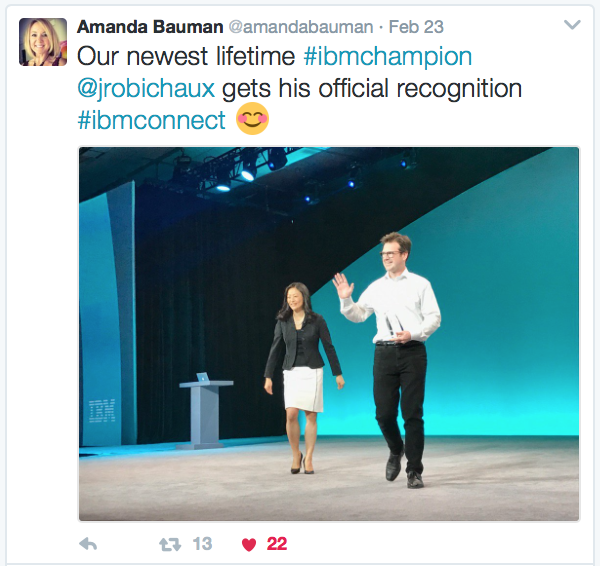
Gab Davis and Theo Heselmans are the original two Lifetime Champions, and to be in a select group with them is so flattering. They are both so incredibly smart, helpful, and professional that last year when they were named the first Lifetime Champions ever absolutely no one was surprised. Who else would it have been? They are the top of the class. When I found out I was #3, I was blown away.
I even got to go on stage at the opening AND closing session at the Connect conference! How cool is that!?!
Really, it was a huge (and terrifying) thing for me.
I have so many thank you's that I can't even begin to list everyone, but I do know where to start: Amanda Bauman and Libby Ingrassia run a spectacular program for the IBM Champions on the Social Business side of the house. They work their tails off promoting the program and giving the people in it visibility, both inside and outside of IBM. They make it mean something to be a Champion, it's not just an empty title. They give us a collective voice, they put our names and faces on giant screens at conferences, and they give us access to information and people that we would never have access to otherwise.

A giant group thank you to ALL the people who congratulated me on Twitter and Facebook. Within an hour of receiving the Lifetime Champ award on Tuesday, I had to stop "liking" all the congratulatory messages on social media because I simply could not keep up -- and it started feeling like bragging because I was filling my timeline up with "likes". But it literally went on all week. There were way over a hundred messages, likes, and retweets. I was just... I couldn't believe it. I still can't.
Thank you to the folks who arranged it so that I received the official award in front of the entire audience at the Closing Session -- announced and presented by Inhi Cho Suh! That was scary and amazing.
Thank you to the people who spent so much time and effort writing really flattering articles and blog entries about the whole thing. The IBM article even appeared on the IBM Connect landing page, which was so cool.
And thanks to all the people who gave me handshakes, hugs, and fist-bumps when they saw me in person at the conference. I have no idea how many people that was but it was a lot, including some people I didn't even know.
I hope this doesn't seem like bragging, because it's really not. I mean, I am super proud of getting this award, but I am just so horrible at showing my appreciation that it's hard for me to find the right way to say things sometimes. So... thanks!
While working through some demos for my upcoming
ConnectED session on Java, I noticed some unusual behavior when making an HTTP connection in a Java agent on an IBM Notes client. We will only be talking about Java in the context of XPages for the session, but I wanted to try everything out in an agent too in case anyone asks. I had one bit of code that worked fine on XPages but which failed on
some of my test clients. It looked like this:
URL url = new URL( myAwesomeURLString );
InputStream in = url.openStream();
In the context of an agent, running on a Notes 9 client, those two innocent lines of code gave me this error:
java.lang.NullPointerException
	at sun.net.www.http.HttpClient.parseHTTPHeader(HttpClient.java:738)
	at sun.net.www.http.HttpClient.parseHTTP(HttpClient.java:665)
	at COM.ibm.JEmpower.applet.http.HttpURLConnection.getInputStream(HttpURLConnection.java:411)
	at COM.ibm.JEmpower.applet.http.HttpURLConnection.getHeaderField(HttpURLConnection.java:703)
	at java.net.HttpURLConnection.getResponseCode(HttpURLConnection.java:399)
	at JavaAgent.NotesMain(JavaAgent.java:18)
	at lotus.domino.AgentBase.runNotes(Unknown Source)
	at lotus.domino.NotesThread.run(Unknown Source)
The connection worked, but getting the InputStream failed. That was especially weird because (A) I've used that code plenty of times before without error, and (B) it worked just fine on at least one of my other test clients.
Looking this up on Google I found only sparse reports of other people experiencing this: a question on StackOverflow and a thread on the atnotes.de forum. At the bottom of the atnotes thread there was a link to an IBM APAR that mentions this problem in Notes 8.5.3, but it was specific to applets... and it was opened in 2013 and closed about a year later (I have no idea if there was a fix involved, but it is marked as closed).
If this was a widespread problem there would have been a lot more chatter about it on the Internet, so I assumed that there was something specific about my setup that was causing the error.
After many restarts and toggled settings, and much pulling of hair, I was able to find a set of steps that would either cause the problem or prevent it. To make the code work:
- Open the Notes client
- Run the Java agent
- HTTP connection works
To get the error:
- Open the Notes client
- Open the Java Debug Console
- Run the Java agent
- HTTP connection fails
There's something about opening the Java Debug Console before running the agent that causes Notes to use a COM.ibm.JEmpower.applet.http.HttpURLConnection to make the connection instead of a sun.net.www.protocol.http.HttpURLConnection, and the JEmpower version of the class is the one that's broken (per experimentation and the APAR mentioned previously).
Oddly, if I run the agent and then open the debug console and then run the agent again, everything is fine. It's opening the debug console before I do anything that causes problems.
My best guess is that this started with Java JVM 1.6.0 SR12, which was included with IBM Notes 8.5.3 FP3 and Notes 9.0.0, but it could have been before that too. In any case, now that I know not to open the debug console first, that'll be my workaround.
In celebration of the Daylight Saving Time changes over the past two weekends, we (at
panagenda) have released a new sidebar app for the Notes client to help you manage your timezones. For free! Please see
the panagenda blog for details.
Here's a screenshot from earlier this morning:
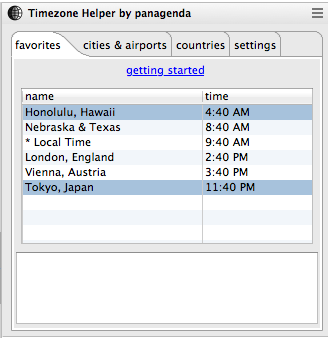
The entries in blue are currently outside of business hours ("night-time" for my purposes), and the clocks update throughout the day so I can always glance at the times and say things like, "Oops, it's too late to call" or "They're probably at lunch" or "It would be so awesome to live in Hawaii".
Tested on Mac and Windows, IBM Notes client version 8.0.2 and up. It's been very useful for me, and hopefully it'll be useful for you too.
Incredibly flattered and excited to be on
the early announce list for the IBM ConnectED conference in January!

It's gonna be a great show. The session on that list is one I submitted with Kathy Brown as a co-speaker, where we'll be taking the fear out of Java programming on IBM Domino with concise, easy-to-understand (and useful!) examples. It's a brand new session, and we've got lots of ideas for code as well as integration topics.
Hurry up and register if you haven't already. I hope to see you there!
My latest Clippings article is out. It is an overview and discussion of the java.policy file, how basic Java security policies work, and some of your options for using them in the context of IBM Notes and Domino.
Following up from yesterday, here is a list of my Clippings articles since the move to the new SocialBizUG.org site:
The easiest way to keep up is to subscribe to the monthly newsletter. To do this:
- Go to the Clippings Community page
- Click the "Log in" link at the top right to log in
- Your user name should now display at the top right. Hover over the user name and choose the "Account Info" option
- Scroll all the way down to the bottom of your Profile page and select "Clippings" from the list of newsletters. You may as well subscribe to the Admin and Developer newsletters while you're there too, just to see if you like them. ;-)
A few FAQs about content on this old, creaky website based on emails I've received.
A link in one of your old blog entries doesn't work. Will you fix it?
No.
Okay, I suppose it would be polite to explain. I apologize for being snippy. Let's say "probably not".
Content on the Internet is transient. This blog has been around for just over 12 years, and some of the things I linked to in the past just aren't there anymore, or they have been moved somewhere else. That's just how it goes. For me to constantly track, look up, and try to fix those things... well, it's just not that important.
Besides, you can use Google just as well as I can. ;-)
In the special case of IBM Technotes that have seemingly vanished (for example, Technote 1305829 describing how to construct an extension.xml file for Widget deployment), I really do wish I had a hidden cache of archived knowledge that I can share with you, but I don't. I'm sorry. I am getting into the habit of saving useful Technotes as PDFs in case they disappear, and I suggest you do too.
Do you have new links to your old LotusUserGroup articles?
Unfortunately I do not. When the old LotusUserGroup.org website was retired in favor of SocialBizUG.org, none of my old Clippings content got moved over to the new site. A few of my old articles have been republished at my request, but the SocialBizUG folks have told me that they're not planning to reprint my old stuff en masse.
I can't just reprint the old articles here either, because SocialBizUG more or less owns the content. I'm sorry and if that changes, I will let you know.
Where are the slides from the presentation you gave at ____________?
I do have a Presentations page here on the site, but it is woefully untended. I apologize for that too, and I also apologize for apologizing so much in this blog entry.
I will try to update that page soon because I think it's important, but in the meantime here are some presentations I've given most recently:
Did you stop blogging/podcasting? Can I have your stuff?
It's hard to say that you've ever "stopped" doing a thing, so much as you start doing it a lot less frequently. That's how I feel about blogging here or podcasting with Bruce. Sometimes you take a break. Maybe you come back to it later, maybe you don't. No big deal.
In the meantime, I'm still doing presentations and writing bi-monthly developer articles for Clippings, so that's something. And honestly, the stuff I do daily working on panagenda MarvelClient (sorry for the blatant plug, but that's what I do full time and it's really cool stuff) is either very esoteric or very product-centric, so it's hard to pull bits of that knowledge out and talk about it here.
That's all for now. Nice to see you again.
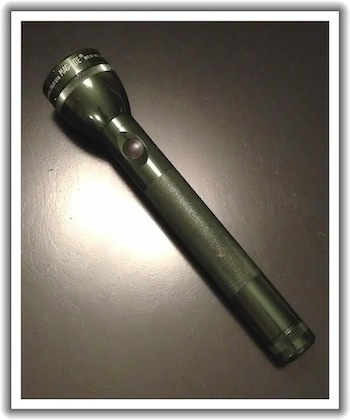
This is my
Maglite.
It turned 20 years old today. I know that because I emailed the serial number to Maglite support and asked them when it was made. They look up the number in their database and give you the date of manufacture. 11/19/1993. That's my big guy's birthdate.
A few things about this. First, I don't have any other electronic devices anywhere near this old that are still in regular use. I do have some clothes that old that might get worn occasionally (don't judge), probably some tools, definitely some books, but nothing that plugs into the wall or uses batteries. I turned on the Maglite as recently as a few days ago.
TRIVIA: I still used the original bulb up until this year. The bulb lasted 19 years. Even more impressive, vowe suggested that I check the endcap for a spare when it burned out. Spare was there, and it works! After all this time I don't even have to buy a new bulb.
Second, I continue to use it despite the fact that I've got a few other flashlights that are much brighter. I have a little $4 Chinese flashlight that I use sometimes (when I can find it) that puts out a lot more light, but the old Maglite is always the first thing I go for. I've dropped it and gotten it wet and probably even used it as a hammer; it has kind of an Old Reliable feel to it. It would be part of my Zombie Apocalypse Kit if I had one.
Third, it has that intangible brand loyalty thing going on. If this thing ever [somehow] breaks, I will go right to the store and buy another one. Maybe two (cause I kinda like the MAG-TAC line). I'll probably give one to each of my kids when they move out of the house someday. And then they'll be like "Really Dad, a flashlight?" and I'll be all "It's not a flashlight, it's an heirloom!" and they'll talk about it in counseling 5 years later. Whatever, I'm doing it anyway.
It mostly comes down to quality. I can buy cheap throwaway flashlights that are brighter and newer, but they're just... disappointing. This thing has good heft, it takes a beating, and it lasts forever (in flashlight years). I'll always pay extra for that.
Any comparison or metaphor to software, technology, or life in general is an exercise left to the reader.
Every user of Domino Designer in Eclipse (aka DDE, aka Domino Designer 8.5+) probably already knows how to adjust their JVM settings to give DDE more memory.
Andrew Pollack did a nice writeup on it way back in 2008, and there's now an
IBM technote on the subject.
But, like most things, it's good to delve a little deeper into the topic so you can really understand what's going on. Here are the IBM suggested settings and what they mean:
vmarg.Xmx=-Xmx1024m | Maximum Java heap size (memory used by the JVM) is 1024MB. The lowercase "m" at the end is quite important; don't leave it off or make it capital. |
vmarg.Xms=-Xms512m | Initial (and minimum) Java heap size is 512MB. |
vmarg.Xmca=-Xmca512k | Block size used for increasing memory allocation is 512kB (note that this value is in kilobytes, not megabytes) |
The technote includes some helpful additional information:
- The
Xmca setting is a block size for both adding and freeing memory, and is significantly higher than the default. This is as important as the Xms and Xmx settings but many people forget to set it. Don't forget this one! To quote the technote: "With the original settings, Designer can spend a great deal of time adding memory in small 8 K blocks or trying to free preassigned memory blocks when the 256 MB upper limit is reached. As a result, it appears to hang/freeze when actually it is working to allocate or free up memory in order for the program to run."
- These are combined settings for the Notes client, DDE, and Domino Administrator. So if you have all three open at the same time they will SHARE the memory, they will not each have 1GB of memory to work with.
- Another direct quote the technote: "In a post Notes/Designer 9.0 release, these higher values will be set by default in new installs, but currently you must change them manually." Yay future fixes!
So that's good stuff right there. Maybe all you need to know. If you want to see some screenshots to back up the instructions in the technote, the TLCC page on this subject is a handy reference. If you want a bit more detail, please keep reading below.
First, 1024m is a very good setting for the max heap, even if you have tons of RAM installed on your machine. This is because the Lotus Notes client on Windows (at least as of version 9.0) still uses a 32-bit JVM. You might be running Windows 7 64-bit with 8GB of RAM, but you've still got a 32-bit JVM. According to the IBM Java documentation, the maximum amount of memory available to a 32-bit JVM is 1.8GB. However, some people have problems setting the memory too much higher than 1024m -- it supposedly has something to do with contiguous memory allocation, but I really don't understand the details -- so 1024m is a safe value. If you have less than 2GB of RAM on your workstation (and I'm really sorry if you do), don't go higher than 50% of installed RAM.
Second, you should set the minimum heap size to be smaller than the maximum heap size (as recommended). There are plenty of web sites that will tell you (especially for Java servers) to set the minimum and maximum to the same value for efficiency. Unfortunately, for a client application like Lotus Notes this can potentially be less efficient. Not only can setting the values equal prevent effective garbage collection, it can also cause heap fragmentation. This document on IBM JVM heap sizing has a very nice explanation.
Third, these JVM settings are normally placed in the jvm.properties file in the Notes framework directory. If you install a FixPack or a new version of the Notes client, your custom JVM settings might get overwritten. Some (many? all?) FixPacks and upgrades reset the jvm.properties file. Every time you upgrade or patch your client, you should re-check the jvm.properties file and reset it if necessary.
Fourth, you can also put these settings in the rcpinstall.properties file. This file is in your data\workspace\.config directory, which has the unique advantage of being editable even if your Windows setup has the Notes program directory locked down. It also overrides any values in the jvm.properties file. Keep in mind that this file might also get overwritten when you upgrade your Notes client -- or if you delete your workspace directory.
I personally prefer to put the values in the rcpinstall.properties file, especially because this has priority over the jvm.properties file so I have much more confidence that the settings will be used. If you're curious about what the final values used by your Notes client are, you can go to the menu option Help - About IBM Notes and click the "Configuration Details" button, then scroll down to the -Xmx setting.
Or, as mentioned in the technote, you can open Domino Designer and use the "Show heap status" preference. A couple things about that preference though: (1) it only works for me if I unset and reset it after I restart Notes, and (2) you need to hover over it to see the actual max heap size, which is labelled as the "Mark" size on my Notes 9 client. The "max" size listed in the heap status bar is usually less than the max heap size.
Before anything else, I want to give a huge
THANK YOU to everyone who
supported me in the mud run by donating to the Myelin Foundation and
The Art of Curing Matt. I don't have any official numbers, but I do know that over $1,000 was donated in under 4 days, and that is incredible. You are an amazing and generous community.
Next, I am happy to announce that Chris Miller wins the "Guess The Mud Run Time" prize. He will be receiving a very cool piece of art by Matt Reimer himself: a drawing depicting an inhabitant of Matthewland. Thank you Matt and Troy for offering that as a prize.
If you are morbidly curious about what it looks like for me to participate in a mud run, I have put together a special mud run tips page with bits of advice for anyone else who might want to try this sort of thing. At the bottom of the page is a link to a gallery of pictures that my wife was fantastic enough to take as she tracked me (with a huge grin on her face) at various obstacles.
If you're wondering: yes, I did get pretty dirty. But my face stayed clean and the mud stayed out of my mouth. So that's something.
Finally, for your viewing pleasure:

In the actual video you can hear my daughter yelling "Lie down in the mud Dad!". Children are so precious.
Today is the final day of mud run training (the race is tomorrow, did you
sponsor me yet?).
Upon recovering from yesterday's mud-in-the-face bit, I decided it would be better to hold off on any more intentional dirtiness before the race. I have switched metaphorical tactics from "wading slowly into the pool" to "jumping off the diving board". Tomorrow will be the dive.
So today I have been picking out clothes for the race. Here's what I came up with so far:

The rationale is:
- Old running shoes, so they can be thrown in the donation pile after the race
- Long socks to protect from scratched up legs
- "Performance" boxer briefs to (hopefully) act as a little extra protection against mud exposure... I anticipate the moisture wicking fabric being like teflon against the mud
- Shorts to be worn over the boxer briefs (duh)
- Bacon shirt (duh again) -- this one is a bit small and tight, which is supposedly advantageous sizing in a mud run situation
That's right, I showed you a picture and offered a rationale for my running undershorts. Please donate so we won't have to do this again.
Thank you for your support.
As part of today's mud run training (and further incentive for you to
sponsor me), I increased my dirt-tolerance quotient by allowing my kids to throw mud at my face.

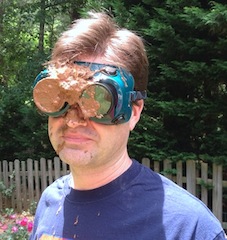
I apologize for the slightly large size of the animated gif (I usually try to keep graphics much smaller than that). I just thought it might have a bit more impact that way. Plus, animated gifs are all the rage this year, aren't they?
The kids originally thought that they were allowed to throw the entire bucket of mud on my face... I had to explain to them (twice) that they were allowed only a handful each. I was glad for a nice shower afterwards.
Now, if you haven't donated to The Art of Curing Matt yet, hurry over to my Sponsor Me in a Mud Run page and do it before you forget!
First off:
huge thanks to those of you who have sponsored me already. If you haven't donated yet, please take a quick look at my
Sponsor Me in a Mud Run page to learn about
the great cause I am helping to raise money for, and please consider even a small donation. Every dollar helps!
As part of my last-minute training for this event, I will practice getting dirty a little more and a little more each day. Here is day 1:

Hey, you gotta start somewhere. Georgia red clay is very... mushy.
It is also important to set proper expectations. I knew that a mud run would involve mud and general dirtiness, but I'm not sure I appreciated quite how much filth is involved until I looked at a few "What to expect in a mud run" articles last night.
There are frightening stories comparing post-mud-pit to being an unwiped baby, and warning runners who don't normally wear underwear (really?) to buy some nice long spandex. Apparently you have to be very careful not get your shoes sucked off in the pit too -- some folks use duct tape to secure them to their legs -- and people advocate taking a running belly flop leap into the deep mud rather than going feet first.
Horrible.
Some of the important points seem to be:
- Don't swallow the mud (never been a problem before, but maybe that's easy to forget)
- Wear tight-fitting clothes; loose clothes get very heavy and saggy
- Either wear sneakers that are easy to wash, or ones that you don't ever want to wear again (many races have a donation pile where you can dispose of nasty running shoes)
- Consider wearing gloves for the crawling and climbing
So it seems that I should wear spandex, rubber shoes, and gloves. If I add a cape I'll be a superhero. I'm considering shin guards and a surgical mask too. Maybe goggles.
Short version: please help me raise money for
The Art of Curing Matt. You can sponsor me in a mud run this weekend! Just go to
the donation page and follow the instructions. If you have the closest guess to my actual finishing time in the race, you'll win a prize! I don't know what the prize is yet, it might be something silly... your suggestions are welcome in the comments.
Longer version: I know that a lot of people have been asking for donations for various charities recently -- people in the "formerly known as the Lotus Community" and elsewhere -- but please take just a minute to read this.
Troy Reimer is a good friend of mine. I worked with him at SNAPPS a few years ago, he's an excellent programmer, and he's a really really nice guy. You might have met him before, or seen him speak at a conference, or used some of his code. Even if you don't know him personally, you're only one degree of separation away from him as you're reading this.
Two years ago, Troy's 10 year old son Matt was diagnosed with a genetic disorder called Adrenoleukodystrophy (ALD). Click through to the About ALD page on the Art of Curing Matt website for details on what ALD is and what it does to those who have it. Because it's a relatively rare disease, there is a very limited amount of research into treatments and potential cures.
The Reimer family is putting together an art auction to raise money for the Myelin Project, a non-profit organization that funds research for diseases like ALD.
I won't be at the art auction this weekend, but I wanted to try to do something to help raise money and awareness.
On the same day as the art auction, there is a mud run near where I live. People who know me also know that I don't like dirt. Or getting dirty. Especially not intentionally. However, I will allow myself to get covered in mud and other outdoor woodsy filth for a cause. So here's what I'd like you to do:
- Go to the Mud Run donation page on this site
- Use the big "Donate" link make whatever donation you can (NOTE: I am not collecting any money myself, it is all going directly to the charity)
- Click the "Guess The Time" link, and guess how fast (or slow) I will run the race
- Give yourself a pat on the back, then go and tell other people to do what you just did
I don't really have any good way to track the money that I'm personally raising -- I'd like everyone to donate directly instead of going through another site that would charge administrative fees -- but I will maintain the list of guesses about my race times. Hopefully that will result in some small amount of competitive activity to keep everyone engaged for a few days.
I will also post pictures this week during my "training" as well as after the race, for the curious.
THANK YOU.
p.s. - yes, this is very last-minute. But every extra dollar you donate is a dollar that the researchers would not have had otherwise.
This is something that has come up a few times in the past, and I (and other people) have advised about it before, but it certainly bears repeating:
If you are using OpenLog with LotusScript on a Domino server, please set NoLSIStackTrace=True
This is a global variable that determines whether or not the OpenLog code will use Lsi_info(14) to log LotusScript stack traces. IBM has found that the Lsi_Info function (which is part of the LotusScript language) can cause serious problems on the Domino server. You REALLY need to avoid calling this function on the server.
The good news is that (A) as far as I know it is still okay to use this on the Notes client, just not the server, and (B) if you are using OpenLog it is very easy to turn it off globally or on an agent-by-agent basis simply by setting NoLSIStackTrace=True. The bad news is, well, you lose debugging info. But the good far outweighs the bad.
DO NOT PANIC. Just go into your OpenLog database, open the Initialize sub in the "OpenLog Functions" script library, and set the NoLSIStackTrace variable there. Then save and close and use the "Design" server task to push it out to all your databases that use OpenLog. There, you're done.
Don't get scared into thinking that you have to stop using OpenLog, just set the variable and push it out. That's the beauty of deploying script libraries using master templates.